
How to send a large photo gallery to a client without creating a messy handoff.
When a shoot contains hundreds or thousands of images, the problem is not only transfer size. The bigger challenge is keeping previews, client choices, filenames and final delivery understandable.
Use lighter client copies for review, keep RAW/high-resolution originals on your own storage, collect selections against stable filenames, and deliver only the finished files in a separate final stage.
Hundreds of images still need one clear path from review to delivery.
Use lighter client previews for decisions, keep RAW and high-resolution originals on your own storage, and deliver only the finished files that belong in the final handoff.
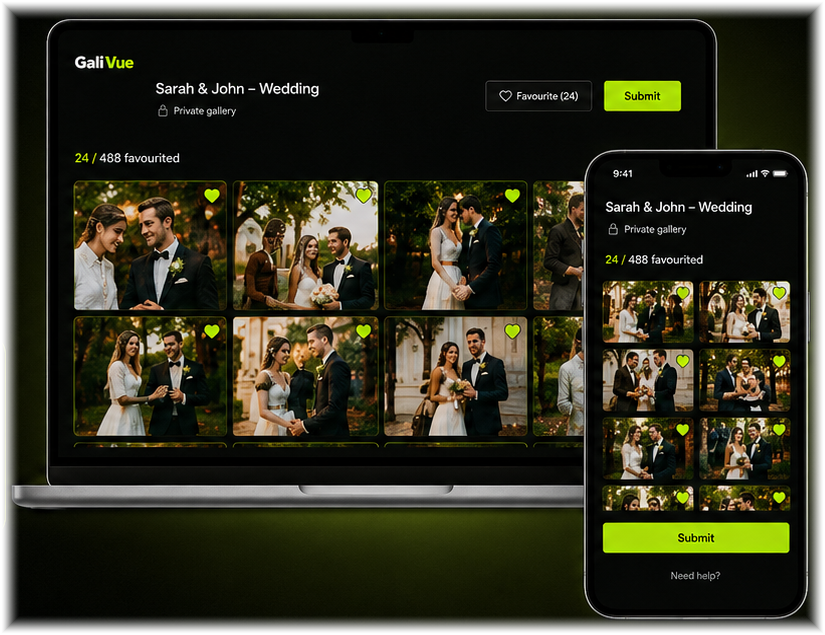
1. Do not use transfer size as the workflow
Large shoots often contain far more source data than a client needs. Sending every original can create unnecessary storage, upload time and confusion. Start by deciding what the client actually needs to review.
2. Prepare client-ready previews
For selection, use supported client copies rather than transferring RAW originals. In GaliVue, client-selection uploads use JPEG, PNG or WebP copies, while the photographer keeps the original RAW/high-resolution files locally.
3. Keep filenames stable
Stable filenames let a client’s chosen preview point back to the photographer’s original file. That is more useful than receiving screenshots, copied filenames or a separate message with an incomplete list.
4. Separate client selection from final delivery
Use the preview gallery for decisions and the final-delivery stage for finished files. This keeps unedited work from being confused with final work and avoids rebuilding the project history across several transfer services.
5. Check current file and plan limits before a large delivery
Large-gallery workflows still need practical limits. GaliVue’s current final-delivery UI accepts JPEG, PNG, WebP, PDF, MP4 and ZIP, with a maximum of 95 MB per file. Storage and project allowances depend on the active plan, so check the current plan before preparing a large delivery.